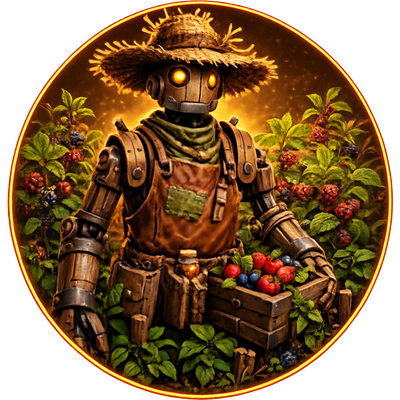
🌾 Crop Warden
Crop Warden adds a placeable farmer NPC that automatically handles the repetitive work around your crop plots.
Place it near your farm, give it some Calien Soup, activate it, and let it take care of your crops.
Crop Warden keeps your farm running while you focus on the rest of the game.
🌱 Features
- Automatically collects berries and vegetables from nearby crop plots.
- Waits until produce stacks reach at least 90% of the crop plot's effective capacity before harvesting.
- Allows you to enable or disable the harvesting of berries and vegetables independently.
- Includes a dedicated Harvest Resources menu accessible from the action wheel.
- Transfers harvested produce to nearby Refrigerators and Preserving Bins.
- Supports Linked Output Storage, allowing you to manually choose exactly where harvested resources should be transferred.
- Automatically falls back to the nearest compatible storage when no storage is manually linked.
- Collects fertilizer from nearby compost bins and compatible storage containers.
- Automatically distributes fertilizer between nearby crop plots.
- Consumes 1 Calien Soup per real-time hour while active.
- Includes an inventory, activation controls, status information, and a visible working range.
- Unlocks at level 25.
- Works in single-player and on dedicated servers.
All resource categories are enabled by default and can be changed at any time from the Crop Warden's action wheel.
📦 Linked Output Storage
Want full control over where your harvested resources are sent?
Crop Wardens can be manually linked to a specific compatible storage structure.
Supported Output Storage
- 🧊 Refrigerators
- 🫙 Preserving Bins
Once linked, all harvested resources will be transferred exclusively to the selected storage.
Radial Menu Options
- 🔗 Link Output Storage — Select a dedicated output storage.
- 🔄 Change Linked Storage — Replace the currently linked storage.
- 👁️ Show Linked Storage — Locate and highlight the linked storage.
- ⛓️💥 Unlink Output Storage — Remove the current storage link.
Compatible storage structures are highlighted in cyan during selection to make them easier to identify.
No Linked Storage → Crop Warden automatically uses the nearest compatible storage.
🛠️ How to Use
- Place the Crop Warden near your crop plots.
- Place Refrigerators or Preserving Bins within its working range.
- Add Calien Soup to its inventory.
- Activate the Crop Warden.
- Open the Harvest Resources menu to choose which resource categories it should collect.
- Optionally use Link Output Storage to assign a specific Refrigerator or Preserving Bin.
- Check its status to see what it is currently doing.
The visible range indicator can help you position your crop plots and storage structures correctly.
⚙️ Automatic Behaviour
Crop Warden is designed to work with as little configuration as possible.
You can simply place it, supply it with Calien Soup, and activate it.
When no dedicated output storage is linked, the Crop Warden automatically searches for the nearest compatible storage within its working range.
Linking a storage gives you more control, while unlinking it immediately restores the default automatic behaviour.
🔗 Mod Compatibility
Crop Warden is designed to work with vanilla crop plots and many stacking or storage mods.
Compatibility has been improved for:
- Modified stack sizes
- Custom crop plot capacities
- Remapped crop resources
- Custom crop plots
- Compatible storage structures
However, some mods may use completely custom systems, so compatibility with every possible mod cannot be guaranteed.
⚖️ Balanced Automation
Crop Warden reduces repetitive farming tasks without making crop production completely free.
You will still need to:
- 💩 Produce fertilizer.
- 🥣 Supply Calien Soup.
- 🌱 Maintain your crop plots.
- 📦 Provide enough nearby storage space.
The goal is to remove repetitive inventory management while keeping farming as an actual part of progression.
🌐 Multiplayer Support
Crop Warden supports both single-player and dedicated servers.
Important actions are synchronized between the server and connected clients, including:
- Crop Warden activation
- Resource configuration
- Output storage selection
- Linked storage replacement
- Linked storage highlighting
- Storage unlinking
The automation logic is handled server-side to provide consistent multiplayer behaviour.
💬 Feedback & Support
Found a bug, encountered a compatibility problem, or have an idea for a new feature?
Please leave a comment on the CurseForge page. Feedback and suggestions are always welcome and help improve Crop Warden in future updates.
⚠️ Known Issues
Some heavily modified crop or storage systems may not behave exactly like their vanilla equivalents.
Please report any problems in the comments and include as much information as possible so compatibility can continue to improve.
🚀 Planned Features
Crop Warden will continue to receive new automation and quality-of-life features.
- ⚡ Tek Crop Warden
An advanced variant powered directly by a Tek Generator. - 📦 Improved Storage Management
Automatically ignore full inventories and continue searching for available storage.
More improvements and quality-of-life features may be added based on community feedback.
🗣️ Need help or want to talk about Crop Warden?
Join the dedicated Discord for support, bug reports, suggestions and development updates.
Let the Crop Warden take care of your farm.