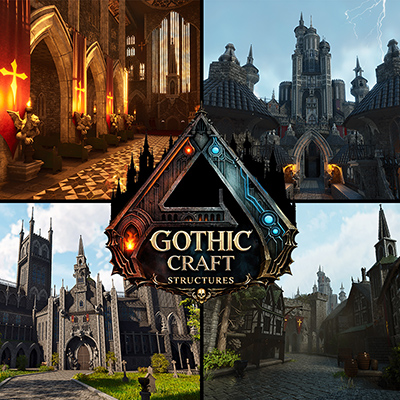
INTRODUCING GOTHIC GRAFT STRUCTURES
Transform your Ark: Survival Ascended world with Gothic Graft Structures.
This mod allows players to create breathtaking, immersive gothic builds by grafting dark-fantasy themed skins onto existing structures. Designed for builders, role-players, and creative survivors, Gothic Graft Structures lets you reshape Ark into a world of towering stone, shadowed courtyards, and haunting medieval beauty—without sacrificing gameplay functionality.
Featuring 6 core skin sets - Castle, Village, Courtyard stone, Courtyard Iron, Trim, and Decor - This mod is perfect for players who want to construct powerful fortresses, atmospheric settlements, and grand gothic environments that feel ancient, imposing, and alive.
Gothic Graft Structures offers a wide variety of skins that can be applied directly to vanilla structures, allowing you to instantly transform your builds without the need to demolish or rebuild.
From massive stone walls and iron-bound gates to elegant arches, detailed windows, and ornate gothic accents, each skin is crafted to deliver dramatic atmosphere, depth, and authenticity.
Most skins include multiple variations, ensuring every build can be customized to reflect your unique vision - whether pristine and regal, weathered and grim, or dark and foreboding.
KEY FEATURES:
OVER 500 GOTHIC STRUCTURE SKINS: Apply highly detailed gothic-themed skins to existing Ark structures, including walls, doors, ceilings, roofs, pillars, railings, and decorative elements.
CASTLE SKIN SET: Construct imposing gothic castles with towering stone walls, reinforced gates, battlements, spires, and grand architectural details. Perfect for royal strongholds, vampire citadels, or fortified dominions.
VILLAGE SKIN SET: Create classic medieval villages with timber houses, simple roads, market squares, barns, and taverns. Suitable for small hamlets, trade towns, or rural settlements.
COURTYARD SKIN SET: Bring your castles to life with richly detailed courtyards, walkways, arches, stairways, and open-air structures. Ideal for inner keeps, grand entrances, ceremonial grounds, and fortress interiors.
TRIM SKIN SET: Enhance every build with gothic trim options including arches, frames, columns, edges, and decorative accents. Designed to seamlessly integrate with all skin sets, adding depth, elegance, and dramatic detail.
DECOR SKIN SET: Bring atmosphere and storytelling to your builds with gothic-inspired decor pieces. Designed to complement all structure skins, these items help transform your creations into lived-in, immersive worlds.
SKIN VARIATIONS: Most skins include multiple variations - different stone styles, structural designs, and visual details - giving you full creative freedom and flexibility.
FULLY PAINTABLE SKINS: All skins are fully paintable, allowing you complete control over color schemes, themes, and visual identity.
EASY CUSTOMIZATION: Instantly apply gothic aesthetics to any compatible structure with simple skin changes - no replacements, no rebuilds.
PERFECT FOR RP & CREATIVE BUILDS: - Ideal for roleplay servers, cinematic builds, gothic fantasy worlds, medieval cities, castles, and kingdoms.
INTEGRATION WITH BASE GAME STRUCTURES: No need to replace or alter your existing structures - simply apply the skins for instant gothic flair while keeping full vanilla functionality.
With Gothic Graft Structures, you can transform Ark into a world of towering fortresses, shadowed villages, and ancient stone architecture - while maintaining the flexibility and mechanics of the base game.
Build your stronghold. Shape your realm. Let stone, shadow, and steel define your world.
HOW TO USE STRUCTURE SKINS
EQUIPPING & USING SKINS: To use Gothic Graft skins, go to the Cosmetics tab in your inventory, then select Apply Cosmetics. You will find a folder under Custom Cosmetics containing all Gothic Graft skin sets.
Move the desired skin set into your hotbar. After equipping it, simply aim at a compatible vanilla structure or item to replace it with the Gothic Graft skin of your choice.
HOW TO CHANGE SKIN VARIANTS: Once placed, interact with the structure or item by pressing and holding: E (PC) Y (Xbox) Triangle (PlayStation) Select the two green cogs on the radial wheel to cycle through available variants.
HOW TO FLIP SKINS: Once you have placed your desired skin, simply interact with the structure/item by pressing and holding the** E key (PC), Y Button (Xbox), Triangle Button (Playstation)**. select the two green cogs on the radial wheel, you can then flip the skin on it's X, Y, or Z axis.
LIST OF STRUCTURE SKINS: A full user guide and list of compatible structures and items can be found here: Gothic Graft Structures Guide
DISCORD If you have feedback, suggestions, or want to report a bug, you can submit them via our Discord
COMPATIBILITY This mod is cross-platform and designed to be compatible with other mods. Partially tested with Keyboard and Xbox Controller.
BUGS
If you encounter a bug or unexpected behavior, please leave a message in the comment section and/or report it via our Discord.
Reporting bugs through Discord helps us track issues more efficiently, communicate with players directly, and push fixes and improvements faster. Your feedback plays a huge role in improving and expanding Gothic Graft Structures, and we truly appreciate every report.
SHOUTOUTS& CREDITS
Mod Testers - Huge thank you to all the mod testers and supporters who helped bring Gothic Graft Structures to life.
Brini - Builder of the trailer set.
Hyper & Sandi Mods - Creator of the Advanced Radial Wheel.