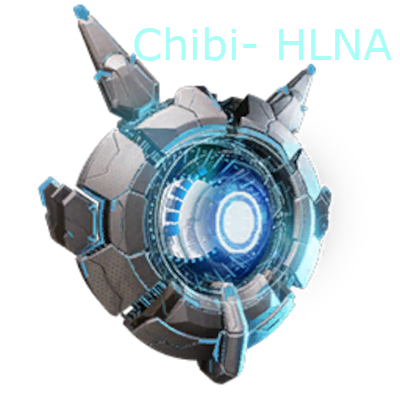
Chibi-HLNA
Please take note that for Rev24 the way the .ini is set up has slightly changed, so you might want to check if your .ini specifics aren't messed up.
This mod brings back one of the fondest memories I had back in my EVO singleplayer days, with the only somewhat useful companion around. Now for Ascended she has returned...with a little upgrade.
Is she the same as Genesis HLNA?
Technically yes, but also no because she's been dramatically "altered" with most features from the original removed, and replaced with new ones that are more useful for my singleplayer adventures.
Future versions will most likely have CHLNA's name changed and/or her model customized given there is going to be a HLNA with Genesis released. I'm not sure, I'm either going to make her all custom, or I'm going to make her some kind of twisted entity that mimmicks HLNA, but more kind of a sinister variant.
The following features have been added/removed:
removed: the Hexagon shop, while mostly intact, wasn't really in a state that I deemed functional
removed: any kind of verbosity, subtitle and reaction frequency setting. Consider this as catch for the fact you have access to a badass overpowered entity, even if it is late game only.
removed: showing mission related information and settings, which should be only accessablle with Genesis DLC's, which appearantly do not exist as of yet.
removed: some of the reactions that had animations attached that would crash the game. See the TOS related info page at the bottom of this mods description.
intact: multi use interaction has been customized with entries tailored to the CHLNA features. The wheel features a Thermal Vision, the default "Cloak Mode" for CHLNA, access to the CHLNA's custom inventory, provides Night Vision(TEK), as well as an option to force tame any knocked out creature, and maximize the level of any tamed creature if CHLNA has Element in her inventory.
intact: the target scan upon using "extended info" is fully functional in "classical" mode, because the extended version crashed the dev kit and most likely would have crashed the game as well. Additionally the target scan has the "Target Tooltip" enabled, which gives you the same quick info the Magnifying Glass does. You can toggle this target info with a .ini customizable key, which defaults to "T". Notice this key will only work "On Target", ergo you must have a target in either your Spyglass, or while holding the Aiming(Targeting) key, which is usually the right mouse button.
intact: her state of the art and only one reason we actually want her, remarks about virtually everything including you "producing fertilizer" and Bob
intact: fully functional animations and particle effects etc.
newly introduced: she's now a Chibi pet, with the complete set of features of a regular chibi including the provision of 5(10) additional levels once you've reached lvl 105. In contrary to a "normal" Chibi, CHLNA can be leveled like the player. Alpha kills are not exclusive
newly introduced: Thermal Vision from that Owl thing I never cared about utilizing. It's functionally an exact copy only you activate/deactivate it with a keypress combo, working as long as CHLNA is equipped. Version 3 introduced a new post process effect(heat gradient), a wheel based toggle and direct toggle functionality when interacting with CHLNA. The Thermal Vision toggle will not work when spectator or in Photo Mode
newly introduced: Night Vision with a slightly customized version of the TEK-Tier Night Vision. The Night Vision can be toggled on the multi use wheel of CHLNA or using a hotkey(Alt+PageDown). It currently has no other prerequisites outside of the level restriction(Level 107)
newly introduced: Force tame any knocked out creature, if you provide enough Element inside your inventory. The quantity is based on the target Dino's level divided by the "ElementDivTame" float variable in the .ini. If both criterias are not met, you will get a valid response. Notice that all Element placed in your inventory will be consumed once the tame was successfull. The target creature must be sleeping, otherwise it does not work.
The quantity of Element is considered against the base level divided by the "ElementDivTame" float variable in the .ini of the to be tamed Dino. You'll need to provide a matching quantity of Element inside your inventory, and need to be as close as possible to the target tame(1000 units), otherwise the interaction dialogue won't even show up.
The force tame label in the CHLNA Interaction Wheel will show the target descriptive name, its level and the calculated element cost, based on the targets vars(currently only level), to verifie you target the right Dino.
newly introduced: Maximize the level of a tamed Dino, if you provide enough Element inside your inventory. The quantity is based on the target Dino's current level divided by the "ElementDivLevelUp" float variable in the .ini. You can then naturally distribute the provided points to the Dinos attributes. If some of the prerequisites are not met, you will be notified. Notice that all Element placed in your inventory will be consumed once the level up was successfull.
The quantity of Element is considered against the base level of the to be leveled up Dino divided by the "ElementDivLevelUp" float variable in the .ini. You'll need to provide a matching quantity of Element inside your inventory, and need to be as close as possible to the target(1000 units), otherwise the interaction dialogue won't even show up.
experimental: A configurable Inventory with incomplete functional support and no existing replication(saving inventory on game left). See the changelog in the file section on rev 20 to get more details.
You can use CHLNA as a temporary mule, upload Dinos to the "Tek Server" and make tributes, as well as uploading the player character to the "Tek Server", effectively ending the game/starting a new character. There are .ini settings to remove the inventory entirely(default: False), if the inventory should be considered "Terminal"(Character/Dino upload) or "Normal", and diverse settings for the spoiling time feature for things stored inside CHLNA's inventory, the max carry weight, and the max quantity of items in her inventory.
What are the requirements to get CHLNA and its features?
Player Level: 105, regular Engram provides Blueprint for player inventory to build CHLNA. You will need to progress through Level 106-110 to unlock all features of CHLNA. The inventory and Target Tooltip Info are available by default. On progression the following features are unlocked: Lvl106 = Cloak Mod, Lvl107 = Night Vision, Lvl108 = Thermal Vision, Lvl109 = Forced Tame, Lvl110 = Maximize Level. Build resources are:
Resources: Element(50), Electronics(100), Polymer(not organic!, 100), Metal Ingot(100), Crystal(50), Obsidian(50), Cementing Paste(not slurp paste!, 200), Oil(crude Oil only!, 200), Silica Pearls(200), Black Pearls(50)
I understand this may be a badass grind for your singleplayer endeavours, but you can customize the recipe in the .ini anytime, plus I think she's giving you a significant advantage on your scouting runs.
Future updates will have many more .ini settings, once I'm out of BETA.
How does interaction work?
Scanning: hold or press the "additional info" key(default H) when targeting any creature or other interactable object. You will also have additional target info(health/torpidity) when using your "aim" key, as long as the target is in the scan cycle time period. The additional target info can be toggled while aiming(with or without Spyglass/Binocs) and pressing the custom .ini key.
Thermal Vision: You will need to have Level 108 and press "Alt+End" while the CHLNA is equipped in your pet slot. The vision will automatically be removed if you unequip CHLNA, or you can toggle it with the same key combo. Using the Thermal Vision will drain a customizable amount of health from the player character. The damage type is radiation.
Thermal Vision can also be toggled on the multi use wheel, or activating CHLNA when looking at her.
Gaining XP for additional Player Levels: kill, harvest, craft, survive, rinse and repeat. Rev 16 introduced leveling the same way Dinos and you do. The sole exception is killing imprinted or tamed creatures.
Interaction remarks: happens automatically on many occasions.
Night Vision: Access via Multi Use Wheel, and a hotkey combo(Alt+PgDn) if you have reached Level 107.
Compact Mode(Cloak): Access via Multi Use and Player(command/emote) Wheel, if you are Level 106.
Force Tame: Access via Multi Use Wheel, if you provide enough Element inside your inventory. The target creature must be sleeping, otherwise the tame will not process and you'll get a fail notification. Upon successful tame the Element will be consumed. Feature access will be granted once you've reached Level 109.
Maximize Level: Access via Multi Use Wheel, if you provide enough Element inside your inventory. The target creature must be tamed, and must not be shoulder mounted otherwise the level up will not process and you'll get a fail notification. Upon successful level up the Element will be consumed. You can then naturally distribute the attribute points in the Dinos inventory. Multiple level ups are possible, but all current levels will be cumulated. Feature access will be granted once you've reached Level 110.
Experimental Inventory: Access via Multi Use Wheel. Defaults to off.
Any .ini Settings?
Yes, you can customize the health drain amount when using Thermal Vision and configure the target level divisor for both, the forced tame and maximum level feature. I've kept the experimental inventory settings intact, but mind though that they might not survive in a final release. Put this into your GameUserSettings.ini:
[CHLNA]
HealthDrainPS=1.000000
UseInventory=False
TributeInventory=False
MaxInventoryItems=-1
MaxInventoryWeight=2000.0
SpoilTimeMultiplier=0.250000
ElementDivTame=10.000000
ElementDivLevelUp=10.000000
KeyThermalVision=End
ModifierThermalVision=True
KeyNightVision=PageDown
ModifierNightVision=True
The default value for health drain is 0.1, draining about 1 health point per 10 seconds. The divisor by which the force tame/maximum level target based Element cost is defined, defaults to 4.0 for both. So this means TargetLevel(let's say 100)/4.0=25, ergo you will need 25 Element inside CHLNA's inventory to initialize the forced tame and/or maximization of the level feature.
Experimental inventory settings: The inventory feature defaults to off(False).)The default value for the inventory type is "True" aka "Tribute Inventory". The default value for maximum inventory quantity is -1(infinite, values of <=0 will be treated equaly). The default carry weight is 1000.0, and the spoil timer of 0.5 makes it so items will spoil faster due to the radiation effect of the CHLNA.
Future versions will have many more .ini settings once I've left BETA.
When I put stuff in the inventory it will be gone when loading a savegame?
Yes, I wasn't capable to recreate replication for non actur/structure based objects in the DevKit. In other words, skins and/or buffs, which CHLNA is based on, can not have a replicating inventory that survives over sessions. This is a hardcoded limitation, probably because would ever have thought modders what try to add a inventory to a non actor/structure based object.
When I set a POI, or add a manual map marker CHLNA will get out of focus and not respond to any inqueries?
Yes, I'm aware of that. But to your and my surprise, that's not a bug. It is "intented behaviour". At least that's what the graph in relation to POI's says. The whole component is deeply entangled into the root HLNA behaviour, and I see no reason to remove or "fix" this, because that's her intented modus of focus and I would probably break a whole lot more of "intented behaviours". Just remember if you focus on map waypoints, or make use of the POI waypoint setup(default: P), she will not respond to you.
Some of the Creatures I'm trying to force tame are not working, or only on a second try?
Yes, I'm aware of that. Some of those creatures have "special" taming customization happening in their code, that I can not manage to adress with a simple "remove IsSleeping" or "AllowedToTameSleeping" flag toggle(for example the Pegomastax). My current solution right now is to reroute the whole force taming process and do it again so the force tame will properly bake. You as a player will not even notice it's happening twice because this engine is pretty damn efficient in covering "unwanted behaviour". I have no idea why, but that's what it is.
My all personal problem in that regard unfortunately is, that I can not nail every little culpriting Dino, and even worse, custom 3rd party mod Dino, without having pre set knowledge about which Dinos are affected. So this is happenning patch by patch. You can however help to speed up the process, by writing in the comments which Dinos you figured are acting "wonky" or not working at all to be force tamed. Thank you.
What about servers?
I "consulted" specialists on that topic...or better said, they actually consulted me. I have no intention to aim for multiplayer in the long run for any of my content, because, frankly, I do not play multiplayer, and most certainly would never play it modded given the current state of modded servers is a bloody mess and a constant crash fest on virtually any of the modded servers I visited. So in that regard I will most likely stay purist for the forseeable future. Needless to say I prefer a modded game by far even if it is only singleplayer, or sometimes non dedicated Lan gameplay.
Version 3 introduced more sophisticated actor calls that should provide full functionality on servers. I'm still lacking a decent server side test environment, so let me know how it works for you guys.
Will you try to reintroduce the Hex shop?
No. In comparison to Kavan's work, or my deeply missed Capitalism, the Hex shop was lackluster at best, with, if at all, limited provision of resources and barely any other use. The multi use wheel however does have a useful purpose. Maybe even giving her some kind of badass beam weapon, or so. Additionally I was fiddling around with "Bullet Time" mechanics and the refraction shader of the Rock Drake, because I have something like my Half Life 2 mod in mind.
Didn't you initially provided regular update multi platform?
That's true. But I'm going to give you an easy mathematic job to reason why I no longer do.
- Waiting time for a mod to be approved multi platform: 24-36, sometimes even 72 hours
- Waiting time for a mod to be approved PC only: nearly instant to few minutes.
The problem is not my impatience alone. It also made playtesting changes in game extremely hard and inconvenient since I had to wait my buttocks off for days, sometimes. I understand loading maps inside the Dev Kit is an option...yeah, you know how long it takes for a map to load, even if I tune down all the settings to low? If I'd ever plan to build or edit map content, I'm going to use a second computer that has the map loaded all the time and will never be turned off. Until then, no, just no. At least not at the same frequency as Master Race updates.
Multi platform reuploads of latest revisions will usually happen under the week, because I rarely play the game between Mo.-We. anyways.
Will we see more mods from you in future?
I just learned how to actually use this utter mess of a very powerful creation engine. If I manage to work around all its flaws and bugs that often make you want to tear your hair out, yes, more content will follow certainly. I've got my aim set for the greatest mods of them all in EVO...The Hunted and Immersive Tamming.
Can you please provide Engram and Cheat spawn info?
Engram: EngramEntry_ItemSkin_ChibiHLNA_C
Item(Skin): PrimalItemSkin_ChibiHLNA_C
Chibi Buff: Buff_ChibiHLNA_C
Thermal Vision Buff: Buff_PredatorVision_ChibiHLNA_C
Someone mentioned this mod is against TOS?
It isn't and I specifically contacted support in that regard. While there may be a "gray zone" about what is stated in the TOS on installing the ASA Dev Kit because parts of it are based on Epic's TOS, the Docs provided by Studio Wildcard, are valid and binding if you consider any kind of TOS violation:
https://devkit.studiowildcard.com/getting-started/additional-information
I'll quote:
"Importing assets from the ARK: Survival Evolved DevKit (UE4) Mod Creators are permitted to use all ARK Survival Evolved assets within their ARK Survival Ascended Mods. The one exception is that Mod Authors may not reupload Official DLC maps as mods.
Mod authors are welcome to import assets from the ASE DevKit and we encourage it if it makes your development efforts easier.
Animation BPS do not support using montages in the animation graph. in ASE this was possible. if you import any Custom animation blueprints that had montages in the animation graph it will crash."
"Exceptions: Exceptions have been made for the following content, these systems are allowed to be used in mods without enforcing the ownership of BTT, possibly with some restrictions.
Dino Traits System: Mod can modify and make available use of the Dino Trait System without enforcing ownership of BTT. Mods MAY NOT use the assets for the Gene Scanner or Gene Storage (gene Infuser) or other gene structure Items/Structures or make them available without enforcing BTT ownership. The system itself may be exapanded , modified and mods may make their own versions of the items and structures use in the trait system, they simply must not use the visual assets or make the existing BTT versions available without ownership."