Mod now showing on Official & unofficial Servers!

INTRODUCING CASTLE CRAFT STRUCTURES
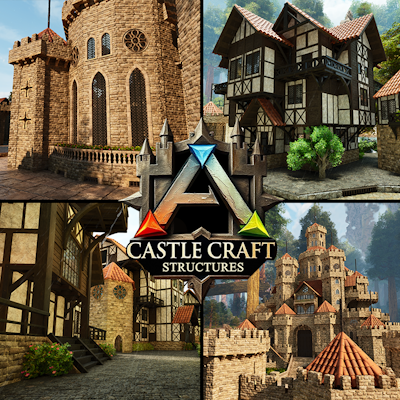
Transform your Ark Survival Ascended world with Castle Craft Structures This mod lets players create epic, immersive medieval builds by applying themed skins to existing structures.
With Four main skin sets - Castle, Village, Settler and Dungeon along with additional Trim, Decor and Utilities Sets for extra customization, this mod is perfect for builders, role-players, and creative survivors who want to craft their dream medieval environments.
Castle Craft Structures offers a variety of skins that you can apply to existing structures, allowing you to instantly give your builds a medieval touch without needing to completely rebuild.
From towering stone walls to elegant wooden gates and intricately designed windows, each skin is designed to bring authenticity and style to your creations.
Most skins include multiple variations, ensuring that your builds can be customized to fit your unique style and vision.
KEY FEATURES:
OVER 500 MEDIEVAL STRUCTURE SKINS: Apply detailed medieval-themed skins (Castle, Village, Dungeon, Trim & Decor) to existing structures, including walls, doors, roofs, and decorative elements.
CASTLE SKIN SET: Build towering castles with intricate stone walls, grand gates, battlements, and majestic towers. Perfect for fortifying your kingdom or constructing a royal stronghold.
DUNGEON SKIN SET: Construct eerie, dark dungeons, secret chambers, or underground lairs, that fit your fantasy.
VILLAGE SKIN SET: Add rustic charm to your builds with wooden and stone structures ideal for creating peaceful villages, cozy homes, and large towns.
SETTLER SKIN SET Create rustic homesteads with wooden cabins, simple fences, cozy hearths, and sturdy barns. Ideal for building frontier villages, farming outposts, or a humble pioneer’s refuge.
TRIM SET: Enhance your builds with decorative trim options that can be applied to any of the three skin sets for added detail, bringing a touch of elegance or flair to your structures.
DECOR SET: Bring a timeless, majestic feel to your creations with this collection of classic medieval-inspired decor items, designed to complement all three skin sets
CRAFTING & UTILITIES SKIN SET Transform your essential structures into medieval-inspired stations and tools. Reimagine the Tek Replicator, Smithy, Generators, Tribe Tower, and more as rustic, hand-forged counterparts that fit the age of knights and kingdoms. Perfect for creating an immersive fantasy world while keeping all your crafting and utility needs functional.
SKIN VARIATIONS: Most skins include multiple variations - whether it's the choice of materials, color schemes, or architectural styles giving you ultimate flexibility in your designs.
PAINTABLE SKINS: All skins are fully paintable, giving you ultimate control over the appearance of your medieval builds.
EASY CUSTOMIZATION: Seamlessly add a medieval aesthetic to any build with simple skin changes, giving your creations a unique and immersive look.
PERFECT FOR RP & CREATIVE BUILDS: Ideal for players looking to craft castles, villages, or entire kingdoms, all while maintaining the gameplay mechanics of Ark.
INTEGRATION WITH BASE GAME STRUCTURES: No need to replace or alter your existing structures - just apply the skins for instant medieval flair.
With Castle Craft Structures, you can enhance your Ark world with the grandeur of medieval architecture, all while keeping the flexibility and functionality of Ark's base structures.
Build your kingdom, defend your lands, and create your dream medieval world - your adventure is only limited by your imagination!
How To Use Structure Skins
EQUIPPING & USING SKINS To use the Castle Craft skins, go to the cosmetics tab in your inventory, then head over to Apply Cosmetics you will see a folder under Custom Cosmetics containing all of the skin sets.
Move each skin set into your hotbar, after equipping the skin set, simply aim at a compatible vanilla structure/item to replace it with the Castle Craft skin of your choice.
HOW TO CHANGE SKIN VARIANTS Once you have placed your desired skin, simply interact with the structure/item by pressing and holding the E key (PC), Y Button (Xbox), Triangle Button (Playstation). select the two green cogs on the radial wheel, you can then cycle through each variant for that skin.
HOW TO FLIP SKINS Once you have placed your desired skin, simply interact with the structure/item by pressing and holding the E key (PC), Y Button (Xbox), Triangle Button (Playstation). select the two green cogs on the radial wheel, you can then flip the skin on it's X, Y, or Z axis.
LIST OF STRUCTURE SKINS A full user guide and list of structures/items that the Castle Craft Skins can be applied to can be found here: Castle Craft Structures Guide
Discord
DISCORD If you have any feedback, suggestions, or want to report a bug, you can submit them via our Discord
Important Notes
COMPATIBILITY This mod is cross platform and should be compatible with any other mods. It has been partially tested with Keyboard and Xbox Controller.
BUGS If you encounter a bug please leave a message in the comment section.
SHOUTOUTS Huge thank you to all the Mod Testers, and a special thanks to BRINI for designing the Medieval sets!