Now on official!
Mod Description:
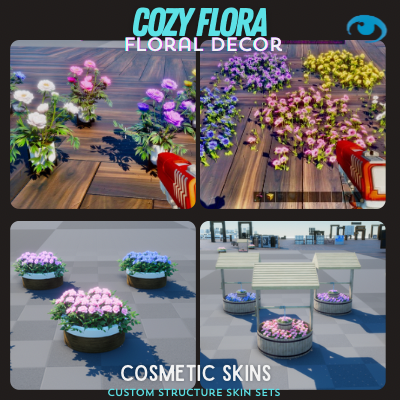
Add vibrant flower beds and flower pots to your world, available in various colors! Transform small, medium, and large decor boxes into customizable flower pots or flower beds that can be placed anywhere.
For large decor boxes, choose between two unique options: a water well or a large pot filled with roses. Switch variants to select your preferred color.
Vines: Found in small, medium decor box. Vines on right found on thin beam
Innovative Customization
Universal Skins: Each skin set works with all building structures. Simply place a skin over any vanilla item to reveal its new look.
Variant System: Almost every piece offers variants, allowing you to mix and match styles within each set.
Resize & Rotate: Adjust the size and rotation of skins to perfectly fit collisions and customize your builds.
All-in-One Access: Find all skins under a single item in the Custom Cosmetics Tab. Equip them via the “house” icon, then hover over any vanilla item to apply your chosen skin.
Aesthetic Excellence
Say goodbye to generic bases. Cozy Cabins transforms your structures into architectural marvels, blending seamlessly with Ark’s environments while standing out with unique charm. Build not just to survive, but to live beautifully.
🛠️ How to Use Cozy Cabins Skins
Equipping & Using Skins
- Open your inventory and navigate to the Cosmetics Tab.
- Go to Apply Cosmetics and locate the Custom Cosmetics folder, which contains all Cozy Cabins skin sets.
- Move your desired skin set to your hotbar.
- Equip the skin set, then aim at any compatible vanilla structure or item to replace it with your chosen Cozy Cabins skin.
- Changing Skin Variants
- After placing a skin, approach the structure or item.
Interact by holding:
E key (PC)
Y button (Xbox)
Triangle button (PlayStation)
Select the two green cogs on the radial wheel.
Cycle through the available variants for that skin to customize its appearance.
Check out this video on X for a visual guide on applying skins, changing variants, and using the scaling system: (https://x.com/knufflesandman/status/1822123729385849051?s=46&t=N9u3PJLS33D5n0jVMvjm1Q "Variants")
📋 Important Notes
Crafting Stations: Due to dynamic download limitations, not all crafting stations are included in this mod.
Item Compatibility: For a full list of items compatible with these skins, visit [insert link here].
Early Stage Disclaimer: This mod is in early development, so minor bugs may occur. Please report any issues via the comment section or our Discord community.
Controller Support: Partially tested with keyboard and Xbox controllers.
Mod Compatibility: Should work with other mods—no known conflicts.
🌟 Join the Community Have questions, need server recommendations, or want to report a bug? Join the Sandi Development Discord for support, inspiration, and to connect with other players:
👉 Sandi Development Discord
Share your epic builds with us on X! Tag us here:
🐞 Bug Reporting If you encounter any issues, please leave a message in the comment section or reach out via Discord. Your feedback helps us improve Cozy Cabins for everyone! Cozy Cabins redefines building in Ark: Survival Ascended. Create a base that’s not just a shelter, but a home. Let’s ascend together into a world where survival meets elegance. 🌿✨